
For businesses operating in the construction industry, having a clear and timely view of project financial performance is essential. From tracking project costs and commitments to monitoring billing, profitability, WIP, receivables, and cash collection, construction teams need access to detailed information to understand what is happening across every project.
With the latest release of Nectari’s CRE templates for Sage Intacct, construction and real estate organizations can bring more of this information together in a flexible, interactive reporting experience designed around the way they work.
These new templates provide users a collection of reporting and analysis capabilities that make it easier to review project activity, identify important financial information, and move from high-level results to detailed transactions, all while continuing to work with their Sage Intacct data.
Flexible Project Billing and Prebill Reporting
Billing is critical to project management, but Sage Intacct’s standard Project Billing and Prebill reports can be limiting when teams need more flexibility in fields, layouts, filters, and how billing activity is reviewed across projects.
Nectari’s new Project Billing and Prebill reports provide a more flexible way to review billing activity across Sage Intacct. The reports bring together billing-related transactions from labor, AP, employee expenses, purchasing, and GL, allowing users to analyze both detailed transactions and summarized activity in one place.
Project Billing Report
Provides a flexible view of billed and unbilled project activity. Users can filter by project, date, transaction type, billed/unbilled status, billable/non-billable status, project billing type, document status, and other project dimensions.
Prebill Report
Focuses specifically on billable transactions that have not yet been billed, giving teams a clear view of what is ready to be invoiced. Users can customize the fields, filters, grouping, and layout to match their reporting needs.
Together, these reports help CRE organizations:
Identify billable transactions that have not yet been billed and review billing before invoicing
Analyze billing activity across multiple projects in one place
Filter by project, transaction type, billing type, and date
Customize report fields, grouping, and layouts
Reduce reliance on manual exports and spreadsheets
Give project and finance teams greater visibility into billing activity
With Nectari, teams can move beyond fixed ERP reporting and use a flexible BI experience to review, analyze, and present project billing information while working directly with the Sage Intacct data they rely on.
Bring Project Costs, Profitability, and WIP Together
Construction organizations also need a clear view of project performance across costs, commitments, contracts, billing, profitability, and WIP. In Sage Intacct, this information can be spread across several reports, making it difficult to analyze project performance in one flexible view.
Nectari’s Project Cost Detail reporting solution brings key project financial information together into a flexible, interactive reporting experience. The solution supports multiple CRE reporting views, including: Project Cost Overview, Job Cost GL Detail, Project Estimate vs Actual Cost Analysis, Project Contract Analysis, WIP as of Date.
Users can move from high-level project performance to detailed transaction analysis while filtering by project, customer, cost code, reporting date, and other key dimensions.
Understand WIP With an As-of-Date View
The WIP as of Date report provides an as-of-date view of important project performance measures, including:
- Percent Complete
- Percent Billed
- Revenue
- Gross Profit and Margin
- Costs and Estimates
- Billings in Excess of Costs / Costs in Excess of Billings
- Retainage
This gives finance and project teams a flexible way to review WIP performance across projects and drill into the underlying project information.
Flexible WIP Account Mapping
Another important capability is the Project WIP Account Mapping worksheet, which allows users to control which Sage Intacct accounts contribute to project cost and revenue calculations.
The initial mappings align with Intacct’s standard project WIP account groups. As new accounts are added or accounting structures change, users can update the mappings directly in Nectari, allowing project cost and revenue reporting to reflect those changes.
This gives CRE organizations the ability to:
- Review project cost, revenue, profitability, and WIP in one place
- Compare actual costs against estimates and commitments
- Monitor project contracts and change activity
- Analyze WIP as of a selected reporting date
- Drill from project-level results into detailed transactions
- Adapt cost and revenue account mappings as the business changes
- Replace multiple rigid reporting views with flexible, filterable BI analysis
Instead of moving between multiple Sage Intacct CRE reports, project and finance teams get a consolidated view of project financial performance with the flexibility to select the fields, filters, dates, and account mappings that matter to their business.
More Flexible AP and AR Transactional Reporting
The new CRE templates also provide users the ability to review receivable and payable balances as of a selected reporting date, including the invoices, bills, payments, adjustments, and retainage that make up those balances.
AP Bills Transactional History & Aging
The AP Bills Transactional History & Aging report provides a flexible historical AP view that combines bills, payments, retainage, adjustments, and related activity in one place. Users can analyze aging based on either Due Date or GL Posted Date, with filters for: Vendor, Project, Transaction status, Date, Other key dimensions.
This provides a more flexible alternative to standard AP snapshot and aging reports, making it easier to review historical balances, aging trends, payment activity, and transaction detail in one place.
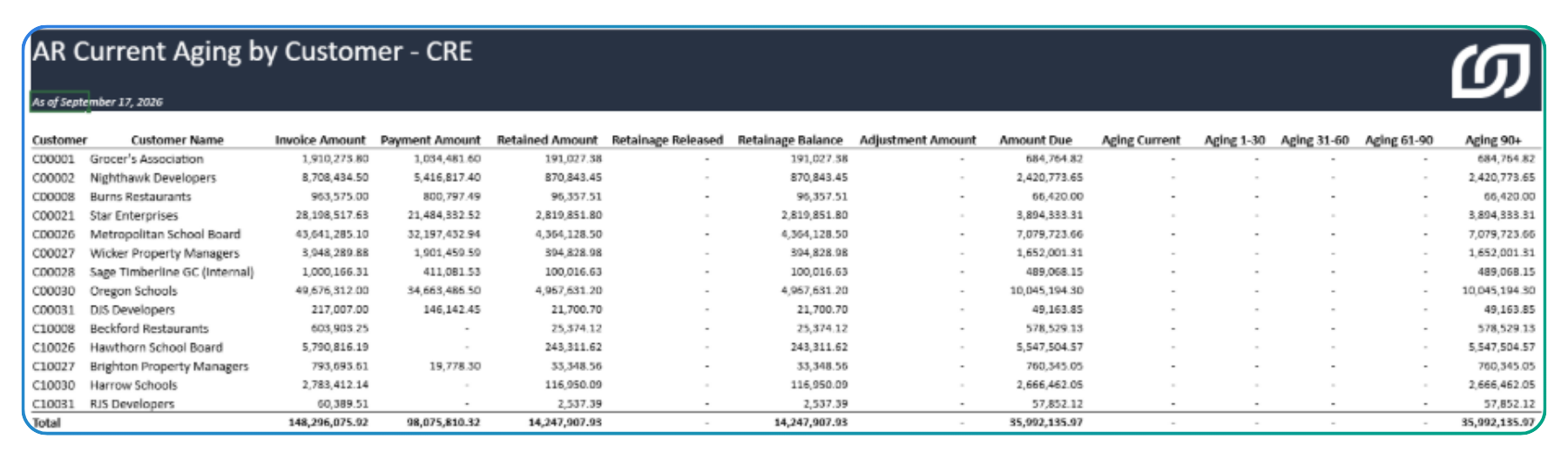
AR Invoice Transactional History & Aging
The AR Invoice Transactional History & Aging report provides a consolidated historical AR view that brings together invoices, payments, retainage, adjustments, and related receivable activity. Users can analyze aging based on either Due Date or GL Posted Date and quickly filter by: Customer, Project, Invoice status, Date, Other relevant dimensions.
This gives finance teams a flexible way to review receivables, collections, aging, and historical invoice activity without being limited to fixed ERP report layouts.
Gain Visibility Into Project Commitments and Estimates
Understanding what has already been committed and what is expected to be spent is another important part of managing construction projects.
Commitment Details by Project
The Commitment Details by Project report provides a clear view of project commitments, making it easy to review outstanding committed costs and analyze them by project, vendor, cost code, date, and other key dimensions.
Project Estimates Report
The Project Estimates report provides flexible visibility into project estimate details, allowing users to analyze estimated costs and quantities by project, task, cost type, item, and other project dimensions for budgeting and cost comparison.
Get a Consolidated View With the Project Dashboard
Project Dashboard
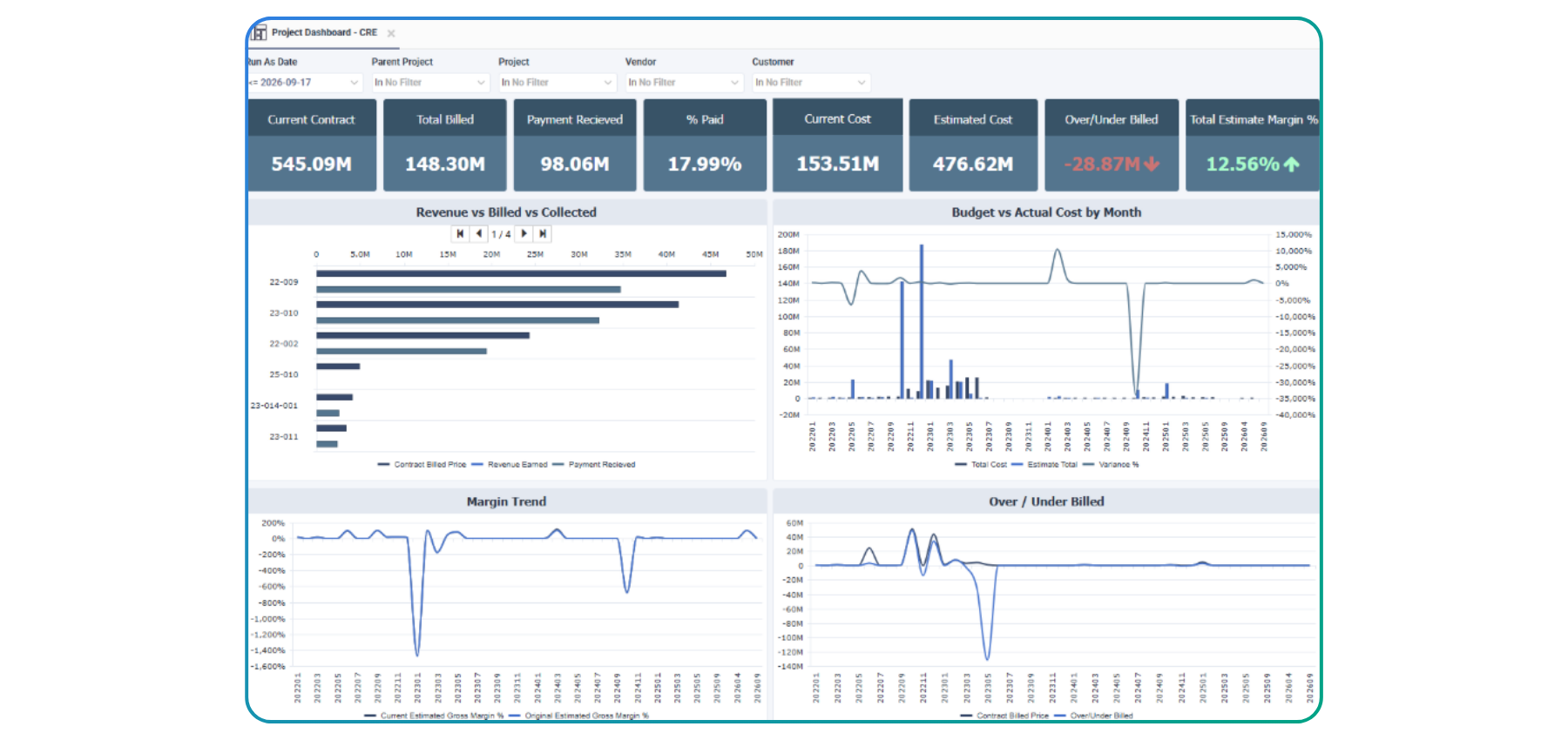
For a broader view of project financial health, the new Project Dashboard provides a consolidated executive view that brings together: Contracts, Billing, Collections, Costs, Margins, Over/underbilling.
The dashboard also includes visual trends for revenue, budget performance, profitability, and cash collection, giving users a centralized way to monitor key areas of project financial performance.
Standardized Reporting With Workbooks
The CRE solution also includes new Workbooks built on top of the previously mentioned data models.
These workbook reports provide standard report formats for AP, AR, and Projects, giving users structured reporting options built on the underlying CRE data models.
Take Action With Writeback Workbooks
Reporting and analysis are only part of the solution. The new Writeback Workbooks are designed to allow users to write information back to Sage Intacct. Currently, the writeback functionality supports the creation and updating of Project Estimates and Project Contracts.
This capability extends the value of the CRE templates beyond simply viewing information, helping bring reporting and operational activity closer together within the same environment.
A More Connected Reporting Experience for
Sage Intacct CRE
Ultimately, Nectari’s new CRE templates give Sage Intacct construction organizations a more complete and flexible view of their project financials. By bringing key information across costs, commitments, billing, WIP, profitability, receivables, and collections into one reporting experience, teams can more easily understand project performance and stay on top of what matters most.
With flexible reporting, dashboards, workbooks, and writeback capabilities, Nectari helps CRE teams get more value from the Sage Intacct data they already have, making it easier to analyze performance, identify opportunities, and make informed decisions with confidence.
Ready to get more from your Sage Intacct data? Discover how Nectari can help your construction organization gain greater visibility into project performance and make reporting more flexible, interactive, and actionable.
